 TabZen Mindful browsing starts here
 TabZen
A Chrome extension that enforces tab and memory limits, prevents duplicates, and helps you stay in control of browser chaos.
Why I Built This
I’m a tab hoarder. At any given moment I have somewhere between 40 and 80 tabs open. Research rabbit holes, articles I’ll “read later,” documentation I might need again, half-finished tasks. My browser is basically a to-do list that I never look at.
The problem isn’t the tabs themselves. It’s that I lose track of them. I’ll have 60 tabs open and not realize it until my laptop fan starts screaming and Chrome is eating 8GB of RAM. By then, closing tabs feels overwhelming. Where do I even start?
I tried a few tab managers from the Chrome Web Store. They all wanted to do too much. AI-powered tab grouping. Cloud sync across devices. Session management with folders and tags. I didn’t want a second browser inside my browser. I just wanted hard limits that would actually stop me from spiraling, and tools to clean up when things got out of hand.
So I built TabZen.
What It Does
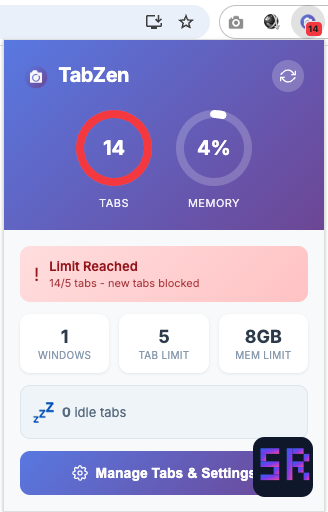 The popup when you hit your limit: a clear warning that new tabs are blocked until you close something.
TabZen sits in your browser toolbar showing your current tab count. Click it and you get a popup with two circular progress rings: one for tabs, one for memory. At a glance you can see how close you are to your limits.
The key difference from other tab managers: TabZen actually enforces limits. When you hit your tab limit, new tabs are blocked. When you hit your memory limit, same thing. You get an in-page notification explaining why, and you have to close something before you can open something new. It sounds aggressive, but it works. Knowing there’s a wall coming changes how you browse.
Core features:
- Tab limit enforcement - Set a max tab count (default 15). Hit it and new tabs are blocked until you close something.
- Memory limit enforcement - Set a max memory usage in GB. Chrome’s memory consumption is tracked and enforced the same way.
- Duplicate prevention - Try to open a URL that’s already open? TabZen switches you to the existing tab instead of creating a duplicate. No more five copies of the same Stack Overflow page.
- Idle tab detection - Tabs you haven’t touched in a while (configurable, default 30 minutes) get flagged. The popup shows how many idle tabs you have with a pulsing indicator, and you can close them all with one click.
- Tab review by domain - A full-page view groups all your tabs by domain. See that you have 12 GitHub tabs open? Close them all at once, or pick through them individually.
- In-page notifications - When a limit is hit or a duplicate is caught, you see the notification right on the page you’re viewing. No need to check the popup to understand what happened.
There’s also a settings page where you can configure everything: tab limit, memory limit, idle timeout, and toggles for each enforcement feature. If blocking feels too aggressive for a particular workflow, you can turn it off and just get warnings instead.
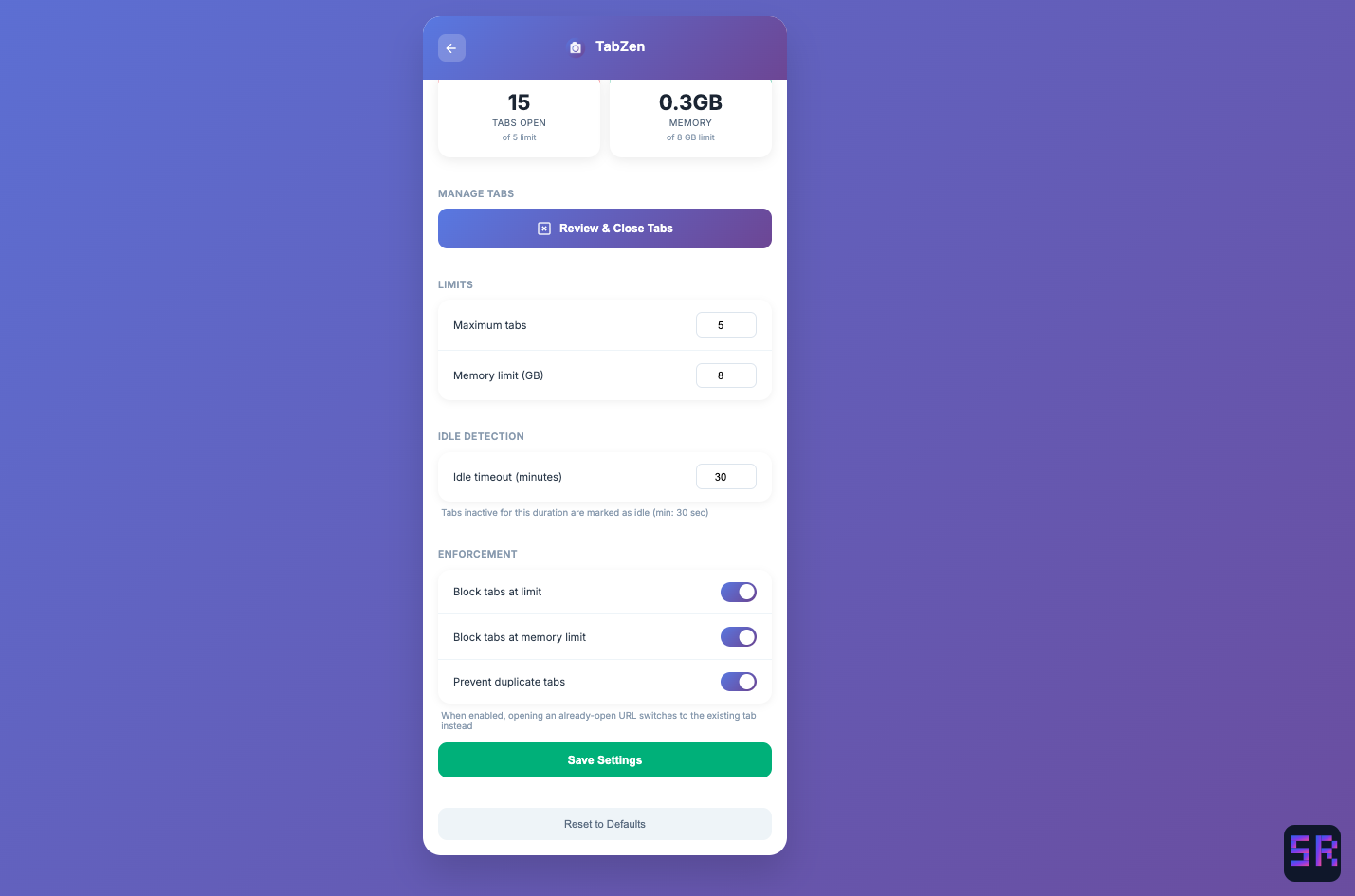 The settings page: configure tab limits, memory limits, idle timeout, and toggle enforcement features on or off.
Built with Claude Code
I built the first version of TabZen in an evening with Claude Code, then kept iterating over the following weeks as I used it and discovered what was missing.
Chrome extensions have a lot of boilerplate, especially with Manifest V3 and service workers. The content script injection for in-page notifications was particularly tricky. Getting memory usage right required digging into Chrome’s process APIs. Claude Code handled all of that, letting me focus on the behavior I wanted rather than the implementation details.
The hardest part was tuning the enforcement. Early versions were too aggressive and I kept disabling the extension. Too lenient and I’d ignore the warnings. The current balance (hard blocks with clear notifications and easy cleanup tools) took a few rounds to get right. Having Claude Code made those iterations fast. Describe the change, test it, adjust, repeat.
What I’ve Learned
Hard limits beat soft nudges. I tried the gentle approach first: color changes, warning badges, nothing that actually stopped me. I ignored all of it. The moment TabZen started blocking new tabs, my behavior changed. Knowing there’s a wall makes you think twice before opening another tab.
Duplicate prevention is the silent hero. I didn’t realize how often I open the same page multiple times until TabZen started catching it. Now when I try to open a link that’s already open, it just switches me there. My tab count dropped significantly from this alone.
Idle detection surfaces the real clutter. Most of my tabs aren’t things I’m actively using. They’re things I opened three days ago and forgot about. The idle indicator makes that visible, and the one-click cleanup makes it painless.
Domain grouping reveals patterns. When I see that I have 15 tabs from the same site, it’s obvious something went wrong. The domain view makes cleanup targeted instead of overwhelming.
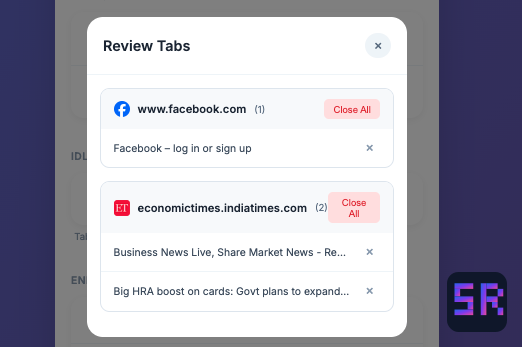 The review tabs view: tabs grouped by domain with “Close All” buttons for quick cleanup.
What’s Next
TabZen does what I need now. If I add anything, it might be a weekly summary showing trends over time, or maybe smarter idle detection that considers whether a tab has audio or video playing. But honestly, the current version has been running for months and I haven’t felt the urge to change much. It enforces my limits, catches my duplicates, and helps me clean up. That’s the job.